

Custom Tables
When the built-in presets (tableSimple, tableSimpleWithImage, tableFourColumn) don’t fit,
implement the TableLine interface yourself. You define the rows and a ColumnConfig layout per
row type — width, colspan, alignment, number format and styling — and mix cell types like
TableCellImage, TableCellLink and TableCellHtml.
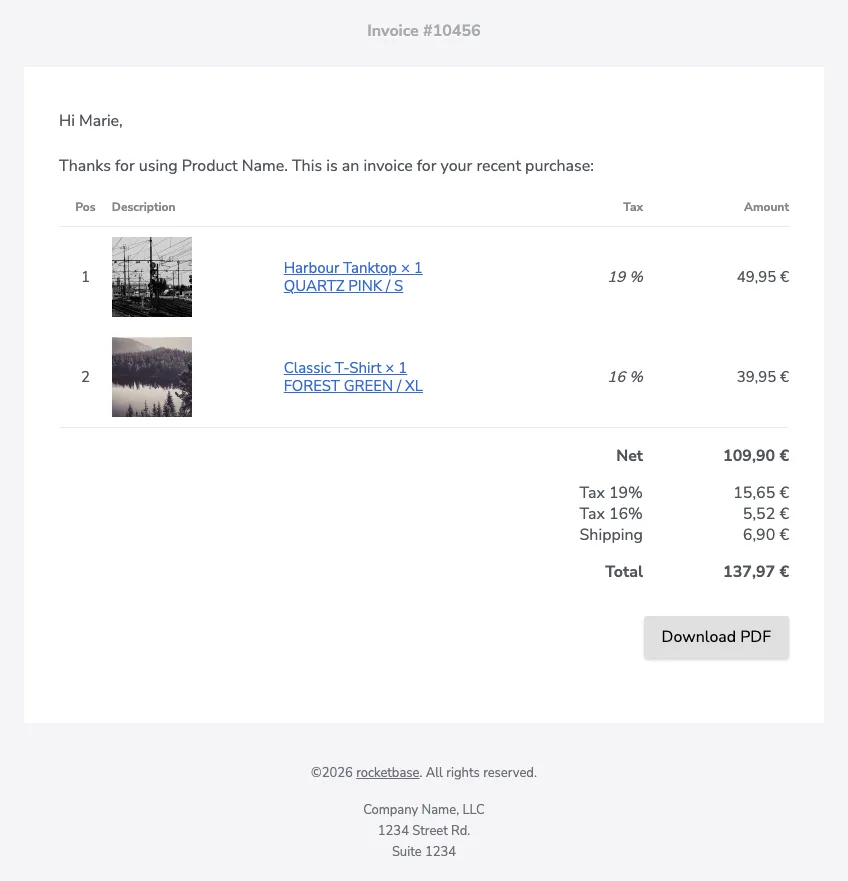
Implementing TableLine
Section titled “Implementing TableLine”@Getterpublic static class CustomTable implements TableLine {
List<List<Object>> headerRows = new ArrayList<>(); List<List<Object>> itemRows = new ArrayList<>(); List<List<Object>> footerRows = new ArrayList<>(); @Getter(AccessLevel.PRIVATE) EmailTemplateBuilder.EmailTemplateConfigBuilder builder; private AtomicInteger posCounter = new AtomicInteger(1);
public CustomTable(EmailTemplateBuilder.EmailTemplateConfigBuilder builder) { this.builder = builder; headerRows.add(Arrays.asList("Pos", "Description", "Tax", "Amount")); }
@Override public EmailTemplateBuilder.EmailTemplateConfigBuilder and() { return builder; }
@Override public HtmlTextEmail build() { return builder.build(); }
public CustomTable itemRow(TableCellImage image, TableCellLink description, BigDecimal tax, BigDecimal amount) { itemRows.add(Arrays.asList(posCounter.getAndIncrement(), image, description, tax, amount)); return this; }
public CustomTable footerRow(TableCellHtml label, TableCellHtml amount) { footerRows.add(Arrays.asList(label, amount)); return this; }
@Override public List<ColumnConfig> getHeader() { return Arrays.asList( new ColumnConfig().center(), new ColumnConfig().colspan(2).width("60%"), new ColumnConfig().alignment(Alignment.RIGHT), new ColumnConfig().width("20%").alignment(Alignment.RIGHT)); }
@Override public List<ColumnConfig> getItem() { return Arrays.asList( new ColumnConfig().center(), new ColumnConfig().width(90), new ColumnConfig().lighter(), new ColumnConfig().numberFormat("# '%'").italic().right(), new ColumnConfig().numberFormat("#,##0.00 '€'").right()); }
@Override public List<ColumnConfig> getFooter() { return Arrays.asList( new ColumnConfig().colspan(4).alignment(Alignment.RIGHT), new ColumnConfig().alignment(Alignment.RIGHT)); }}Pass your table to the builder via .table(…):
TbConfiguration config = TbConfiguration.newInstance();config.getContent().setWidth(800);
EmailTemplateBuilder.EmailTemplateConfigBuilder builder = EmailTemplateBuilder.builder()        .configuration(config)        .header().text("Invoice #10456").and()        .text("Hi Marie,").and()        .text("Thanks for using Product Name. This is an invoice for your recent purchase:").and();
CustomTable customTable = new CustomTable(builder);customTable.itemRow(new TableCellImageSimple("https://picsum.photos/seed/tanktop/160/160").width(80),        new TableCellLinkSimple("Harbour Tanktop × 1\nQUARTZ PINK / S", "https://example.com/?item=1234"),        BigDecimal.valueOf(19),        BigDecimal.valueOf(4995, 2));customTable.itemRow(new TableCellImageSimple("https://picsum.photos/seed/tshirt/160/160").width(80),        new TableCellLinkSimple("Classic T-Shirt × 1\nFOREST GREEN / XL", "https://example.com/?item=4567"),        BigDecimal.valueOf(16),        BigDecimal.valueOf(3995, 2));customTable.footerRow(new TableCellHtmlSimple("<b>Net</b>", "Net"),        new TableCellHtmlSimple("<b>109,90 €</b>", "109,90 €"));customTable.footerRow(new TableCellHtmlSimple("Tax 19%<br>Tax 16%<br>Shipping", "Tax 19%\nTax 16%\nShipping"),        new TableCellHtmlSimple("15,65 €<br>5,52 €<br>6,90 €", "15,65 €\n5,52 €\n6,90 €"));customTable.footerRow(new TableCellHtmlSimple("<b>Total</b>", "Total"),        new TableCellHtmlSimple("<b>137,97 €</b>", "137,97 €"));
HtmlTextEmail email = builder.table(customTable)        .button("Download PDF", "https://example.com/invoice.pdf").gray().right().and()        .copyright("rocketbase").url("https://www.rocketbase.io").suffix(". All rights reserved.").and()        .footerText("Company Name, LLC\n1234 Street Rd.\nSuite 1234").and()        .build();
Cell types
Section titled “Cell types”| Type | Simple implementation | Purpose |
|---|---|---|
TableCellImage |
TableCellImageSimple |
image cell with optional width(…) |
TableCellLink |
TableCellLinkSimple |
text wrapped in a link |
TableCellHtml |
TableCellHtmlSimple |
raw HTML with a plain-text counterpart |
Plain values (String, numbers, BigDecimal) work directly — number columns apply the
numberFormat of their ColumnConfig.